

The $40 Fix That Makes Everything Worse
You bought a WiFi extender to fix the dead zone in the guest wing. The dead zone is gone, but somehow every device in the house feels slower. Streaming stutters in rooms that used to be fine. Video calls drop on the patio. The problem you paid to solve has quietly spread.
This is not a fluke. It is how extenders work. A WiFi extender does not add bandwidth to your network – it divides what you already have. Every extender in the signal path cuts your available speed roughly in half, and each additional hop halves it again. The five-star reviews on Amazon are not wrong about coverage. They are wrong about what that coverage actually costs.
This article explains the physics behind the slowdown, why daisy-chaining extenders makes the problem worse, and what a properly designed network looks like instead. If you have already tried an extender and been disappointed, you are not doing anything wrong. You are running into a limit built into the hardware itself. With the promise set, the next question is a technical one: how does a WiFi extender actually work?
How WiFi Extenders Actually Work
A WiFi extender is a device that receives your existing WiFi signal and rebroadcasts it to extend coverage range. It acts as a middleman between your router and your devices, taking a weak signal in and sending a fresh one out. On paper, this sounds efficient. In practice, it is the source of every problem.
The issue is the radio. Most consumer extenders have a single radio that must do two jobs – receive the signal from your router, then transmit it to your devices. Because it is one radio, it can only do one job at a time. This is called half-duplex operation, and it behaves like a walkie-talkie: you listen, then you talk, then you listen again. You never do both at once.
The math is unforgiving. If the radio spends half its time receiving and half its time transmitting, the effective bandwidth to your device is cut in half before anything else is factored in. Single-band and basic dual-band wireless repeaters typically lose approximately 50% of available bandwidth immediately due to this half-duplex retransmission. That is the baseline loss, not a worst case.
Think of a relay runner who has to sprint back to grab the baton before sprinting forward again. The faster your router, the faster the runner – but the round trip is still the bottleneck. And this 50% loss is just the baseline – it gets worse once a second extender enters the picture.
The Compounding Speed Loss
One Extender: Half Your Speed
On a 100 Mbps connection, a device connected through an extender typically sees around 50 Mbps at best. That is the theoretical ceiling assuming a perfect signal between router and extender. In real homes with walls, appliances, and distance, the actual number is usually worse. Signal degradation, interference from neighboring networks, and the simple fact that the extender sits in a weaker signal area all eat into the remaining bandwidth.
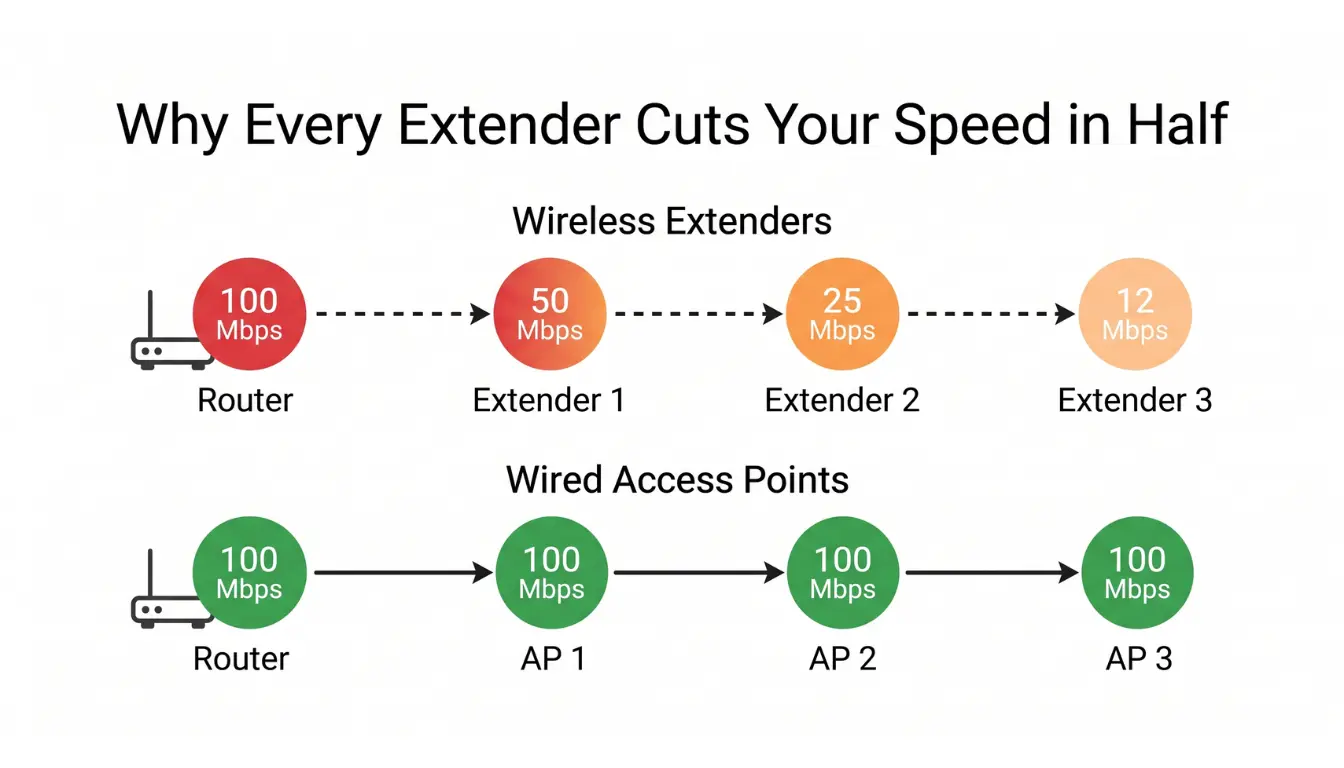
The common real-world result: devices connected to the extender get 30 to 40 percent of the original router speed. Not half. Roughly a third. And this is the best case – the picture changes once a second extender enters the chain.
Daisy-Chaining: The Speed Collapse
When one extender does not cover enough of the property, homeowners often add a second. This is where the math turns brutal. Every additional hop in a standard extender setup reduces the speed by another 50%, making multi-extender chains highly inefficient for high-bandwidth tasks like 4K streaming or gaming. Two extenders in series take 100 Mbps down to around 25 Mbps. Three take it into single digits.
The trap is that each extender looks like it is working. Your phone shows full bars. Coverage maps look complete. But the bandwidth behind those full bars has collapsed, and no amount of signal strength can bring it back. The bandwidth loss from hopping is only one half of the pain – the other half shows up when multiple devices share that reduced pipe.
The Network Bottleneck Effect
All traffic moving through the extender shares the reduced bandwidth. If three people are connected to the same extender – one streaming, one on a video call, one with a smart home hub syncing in the background – they are all competing for the same half-speed pipe. The extender becomes a chokepoint for everything behind it.
This is why an extender that felt fine on day one often feels worse as the home adds devices. Nothing degraded. The math simply caught up. And the bandwidth math is only half the story – understanding this limitation explains why the “solution” also creates a new set of problems on top of the speed loss.
Why You Now Have Two Problems
The Roaming Nightmare
Extenders create a second network – sometimes with an “_EXT” suffix on the name, sometimes silently on the same SSID – Service Set Identifier (the network name your devices see) but with weaker handoff logic. Devices built for consumer WiFi do not switch cleanly between the router and the extender. A phone will stay glued to a distant extender signal even when the user is standing next to the router, because the phone does not know the stronger network is right there.
The result is a daily friction tax: manual network switching, sudden connection drops when you walk from the kitchen to the living room, or video calls that stutter for no visible reason. The roaming problem is compounded by a signal-quality problem that starts even earlier in the chain.
Signal Degradation Compounds
An extender rebroadcasts whatever it receives. If the signal coming in is weak, the signal going out is weaker. Garbage in, garbage out – repeating a poor signal does not fix it, it just spreads it further.
This creates a placement catch-22. Put the extender close to the router and it is not doing much useful work. Put it far from the router and the signal it has to rebroadcast is already compromised. The sweet spot exists in theory. In most homes it does not exist in practice. And beyond the single-device signal problem, the extender also reshapes the wireless environment around it.
Interference Multiplication
Every extender adds another device broadcasting on the same WiFi channels your router uses. In dense neighborhoods, extenders from different homes compete for limited spectrum – and that part you cannot control. Inside your own home, the picture depends on what you bought.
Mixed-brand setups are where interference compounds quickly. A budget extender from one brand has no way to coordinate channel selection or transmit power with a router from another, so the two devices end up stepping on each other and adding noise to the network. This is the scenario most homeowners stumble into, because extenders are usually bought after the router, often years later, often from whatever was on sale.
Coordinated single-brand systems handle this better. Prosumer ecosystems like Eero, Orbi, and TP-Link Omada manage channel assignment and node coordination automatically across their own hardware, which keeps in-home interference low when every node belongs to the same family. The trade-off is control: these systems run on autopilot – they either work or they don’t, with no dashboard to tune the deeper network behavior. Professional-grade platforms like Ubiquiti expose that layer of control, which is why they hold up on larger and more demanding properties.
None of this rescues the underlying physics. Half-duplex retransmission still halves bandwidth at every wireless hop, regardless of brand or coordination quality. These limits are baked into how the category works, and real solutions take a different approach.
What Actually Works Instead
Access Points with Wired Backhaul
An access point is a device that creates a WiFi network and connects back to your router with an Ethernet cable. This single change eliminates the half-duplex problem entirely. Because the connection between router and access point is wired, no bandwidth is lost to retransmission. Using a wired Ethernet backhaul (the connection path between router and access point) bypasses the half-duplex penalty entirely. The result is 100% bandwidth retention at the access point, provided the hardware supports gigabit speeds.
The practical difference is dramatic. An access point placed in the guest wing delivers the same bandwidth as being next to the router, and a second access point in the pool house delivers the same again. Each additional access point expands the usable area of the home without taxing the ones that came before it. Coverage grows without speed loss.
This is the approach used in commercial buildings, hospitals, and hotels – any environment where coverage has to be large and reliable. It works for the same reasons in a home.
Mesh Systems: Better, But Not Perfect
Mesh systems were designed to solve the roaming problem. Mesh nodes talk to each other and to your devices using shared logic, which makes handoffs smoother and unifies the network under one name. Compared to extenders, mesh is a real improvement in user experience.
The physics, however, have not changed. A wireless mesh system still uses wireless backhaul between nodes, which means the same half-duplex penalty applies. A two-node wireless mesh cuts bandwidth at the second node much like an extender does. The mesh marketing rarely says this clearly.
The version of mesh that actually works at scale is mesh with wired backhaul – where nodes connect to each other over Ethernet instead of over the air. At that point the distinction between “mesh” and “access points” becomes mostly branding. For a deeper look at where consumer mesh falls short, see our piece on why mesh systems still have dead zones.
When Professional Installation Makes Sense
On properties over 2,500 square feet, or on multi-story homes with thick walls or detached buildings, extenders and consumer mesh will almost always disappoint. The scale is wrong for the tools. A proper network on a property like this is designed around wired access points, with cable runs planned to land where the home actually needs coverage – the primary suite, the guest house, the terrace, the pool area.
The investment perspective matters here. An extender is a two-year purchase that never really solved the problem. A properly installed wired network is infrastructure that lasts a decade or more and does not get renegotiated every time the household adds a device. These are the questions we hear most often from homeowners frustrated with their extenders.
Frequently Asked Questions
Why is my internet slower after adding a WiFi extender?
WiFi extenders use a single radio to receive and retransmit your signal – they can only do one at a time. This half-duplex operation immediately cuts your available bandwidth by approximately 50 percent. Add signal degradation and interference, and real-world speeds often drop to 30 to 40 percent of your original router speed.
What’s the difference between an extender and an access point?
An extender wirelessly repeats your existing signal, losing speed with each hop. An access point connects to your router via Ethernet cable and creates a new WiFi network at full speed. Access points do not share bandwidth with the connection back to your router – they have a dedicated wired path.
Is there a better solution than WiFi extenders?
Wired access points are the gold standard – full speed at every location with no bandwidth loss. Mesh systems with wired backhaul are the next best option. Even wireless mesh systems outperform extenders due to better roaming and traffic management, though they still lose bandwidth on wireless hops.
Why does my WiFi extender keep disconnecting from the router?
This usually happens when the extender is placed too far from the main router, causing it to struggle with a weak backhaul signal. Environmental interference from thick walls, appliances, or competing 2.4 GHz devices can also cause the connection to drop intermittently.
Do WiFi extenders work through thick walls or multiple floors?
Not well – but the honest answer is that no wireless system handles thick walls and multiple floors gracefully. Concrete, brick, and metal lath absorb and reflect radio waves regardless of which brand or category of device is sending them. Extenders, mesh nodes, and even high-end access points all face the same physics. The fix is not better wireless hardware – it is wiring runs that bring a strong signal directly to where it is needed, instead of asking it to travel through the walls.
Can a WiFi extender cause interference with my main network?
Yes – if it sits within range of the main router on the same or an overlapping channel, the two devices compete for the same airtime and slow each other down. Distance matters here: an extender far from the router on a shared channel may not interfere at all, while one in the next room on the same channel creates a clear conflict. Most homeowners leave channel selection on auto, which works for typical homes but is rarely optimal on larger properties. Deliberate channel tuning – choosing channels based on the actual radio environment of the home – is one of the levers that separates a network that works from one that performs. Many budget extenders also create a separate SSID, which can cause your devices to stick to a weaker signal as you move through your home.
Taken together, these answers point to the same underlying conclusion the rest of the article has built toward.
Stop Extending the Problem
WiFi extenders do not add coverage. They divide your existing bandwidth and create new problems on top of the old one. This is not a flaw of any particular brand or model – it is how the technology works. No firmware update, no premium model, and no clever placement can change the half-duplex physics at the core of the category.
The $40 fix often ends up costing more in frustration than a proper solution would cost in dollars. Every extra device, every new smart home gadget, every Zoom call makes the bottleneck more visible. A network designed around wired access points removes the bottleneck instead of working around it.
If a WiFi extender has already disappointed you, that is useful information. It tells you the scale of your property needs a different tool – not a bigger version of the same one. For homeowners ready to stop extending the problem, a properly designed network can deliver the coverage and speed that should have worked from the start.